Amazon’s Simple Storage Service allows you to store highly sensitive data. Unfortunately, it also allows you to make data publicly available at the same time. The result? Data leaks.
According to recent statistics, 7% of all S3 servers are completely publicly accessible without any authentication and 35% are unencrypted. And if the incidents of the past year are any indication, these aren't low-value data stores.
Here are just a few examples…
- Dow Jones & Co exposed personal data of more than 2 million customers
- Accenture exposed 40,000 passwords, architectural information and code for the company's client-facing cloud platform, decryption keys, certificates, API data and administrator login credentials
- Verizon Wireless was hit not once, but twice, exposing 14 million people’s data
Not only are these huge, public-facing enterprises, the leaks are all due to mis-configured S3 configuration or unprotected servers. Thanks to the cloud, you can launch services within minutes by pressing some buttons. You can take almost anything that someone gives you, drop it into an S3 bucket and publish a link. But, speed opens the door for errors and with new technology comes a lack of knowledge.
Preventing S3 bucket leaks requires proactive cloud monitoring, knowledgeable management, and effective security measures. There are tools available to help support enterprise cloud security. The problem is that they may not go far enough and too many people don’t use them properly.

S3 Buckets Explained
AWS S3 is Amazon Web Services' Simple Storage Service (hence, S3). S3 allows anyone with an AWS account to store data, share files or host simple websites. S3 became popular for several reasons:
- Cost-effectiveness ($0.023 per GB on standard storage)
- Durability (99.999999999% durability)
- Handy, user-configurable lifecycle management features
- Set it up in minutes
Least Access Ensures Maximum Security
There are 3 principals that can be given access to an AWS resource:
- Users: Identities created for specific people in AWS IAM
- Roles: An Identity that has a permission policy associated with it, but doesn’t have passwords or Keys
- Federated Users: Users that are authenticated via a 3rd party authentication system (Google, Facebook, etc.)
Access for each principle is determined by the policies associated with it. Policies are written in JSON and set the rules for access and operation.
Below is an example of a user policy that allows the user with this policy to access the “examplebucket” and allow Put, Get, and Delete rights on any item in that bucket.
{
 "Version":"2012-10-17",
 "Statement":[
    {
       "Effect":"Allow",
       "Action":[
          "s3:ListAllMyBuckets"
       ],
       "Resource":"arn:aws:s3:::*"
    },
    {
       "Effect":"Allow",
       "Action":[
          "s3:ListBucket",
          "s3:GetBucketLocation"
       ],
       "Resource":"arn:aws:s3:::examplebucket"
    },
    {
       "Effect":"Allow",
       "Action":[
          "s3:PutObject",
          "s3:PutObjectAcl",
          "s3:GetObject",
          "s3:GetObjectAcl",
          "s3:DeleteObject"
       ],
       "Resource":"arn:aws:s3:::examplebucket/*"
    }
 ]
}
You can manually write the code yourself in JSON or use AWS’s Policy Generator. The Policy Generator makes it easier to create bucket policies without having to write the code.
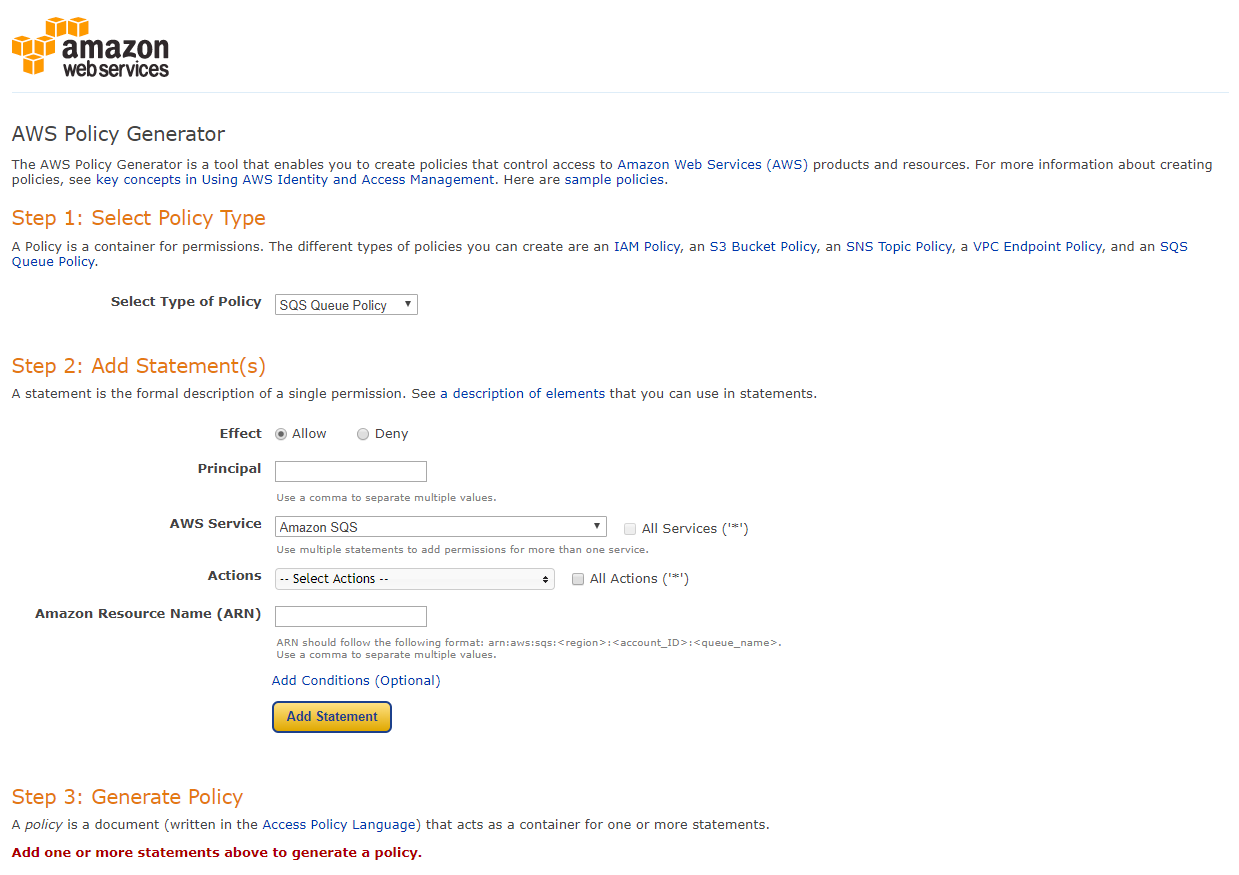
When you’re generating policies, it’s best practice to adopt the principle of ‘least access’. Practicing a doctrine of ‘least access’ ensures that people only have access to the resources they require to do their jobs. By keeping data access as limited as possible, you reduce the number of potential points of entry to sensitive data in your S3 buckets.
S3 Encryption Options
Server-side encryption means that you securely send raw data to AWS to be encrypted. Once encrypted in the AWS infrastructure, the raw data is finally stored on disk.
When you retrieve data, AWS reads the encrypted data from the disk, decrypts the data, and sends raw data back to you. The en/decryption is transparent to the AWS user.
Data at Rest
AWS offers 3 types of server-side encryption for your S3 bucket data:
- Encryption with AWS managed Keys
- Encryption with Customer Master Keys Stored in AWS Key Management Service (KMS)
- Encryption with Customer Provided Keys
Server-side encryption with AWS managed Keys uses AES 256 keys, some of the most secure keys available. The encryption key is also encrypted with a master key that is rotated regularly to provide a “belt and braces” approach for extra peace of mind.
Encryption with customer master keys stored in AWS KMS uses Amazon’s key management service to ensure security. Clients can still use their key and the management service allows you to track key usage and rotate keys on demand.
This option gives you the best of both worlds. You have the key management from AWS, while allowing you to meet any encryption-related compliance requirements your industry or market demands.
If you are encrypting with customer-provided keys, they are managed without KMS. The S3 will use the client key to encrypt and decrypt data.
The other option for encrypting data at rest is to use client-side encryption. Data is encrypted before being uploaded to S3 and keys are managed by the client.
Data in Transit
To protect data in transit, you can use HTTPS (TLS). This will help prevent potential attackers from eavesdropping on or manipulating network traffic using person-in-the-middle or similar attacks. You should allow only encrypted connections over HTTPS (TLS) using the aws:SecureTransport condition on Amazon S3 bucket policies.
Best Practices for S3 Security Management
1. Enable Block Public Access
Unless you explicitly require anyone on the internet to be able to read or write to your S3 bucket, you should ensure that your S3 bucket is not public. Possibly due to the number of accidentally unsecured S3 buckets, AWS announced Block Public Access in November 2018. This safety net offers four options of public access restriction:
- Block public access to buckets and objects granted through new access control lists (ACLs)
- Block public access to buckets and objects granted through any ACLs
- Block public access to buckets and objects granted through new public bucket policies
- Block public and cross-account access to buckets and objects through any public bucket policies
How to Enable Block Public Access for All S3 Buckets
- Open the AWS Management Console
- Go to the S3 service
- Select Block public access (account settings) from the sub-navigation
- Enable Block all public access
2. Use IAM Policies to Grant Access
Using IAM policies makes access control simple and manageable. Use an IAM policy to grant access to your S3 bucket whenever the caller can authenticate as an IAM principal (user or role). Only use a bucket policy when using an IAM policy is not an option.
You should also create a Lambda function that uses the IAM role to review S3 bucket ACLs and policies, correct the ACLs, and notify your team of out-of-compliance policies.
3. Separate Private & Public Data
Don’t mix public data and private data into the same S3 bucket. Doing so increases the risk of a misconfiguration dramatically. It’s also important to tag your S3 bucket to show whether it contains private or public data.
4. Enable Versioning
Versioning allows you to keep multiple variants of an object in the same bucket. This means you can preserve, retrieve, and restore every version of every object stored in your Amazon S3 bucket. This allows you to easily recover from unintended user actions or application failures.
5. Monitor Your Cloud Environment Regularly
To ensure ongoing S3 bucket security, your cloud should be proactively and regularly monitored. You need visibility of all your Amazon S3 resources to assess their security posture and act on potential areas of weakness.
Server access logging provides detailed records of the requests that are made to a bucket. This makes them powerful assets for monitoring your S3 resources. When a new bucket is created, accessed or made public, alerts can be raised, and any issues can be addressed before your enterprise ends up on the news.
However, monitoring a complex cloud environment can be a major challenge to enterprises. That’s why we offer complete peace of mind with our Cloud Management service. We ensure your cloud environment is proactively monitored and risks are managed by a team of cloud security experts. We subject your cloud to over 550 best practice checks, so you can be confident in the security of your enterprise.